This project is archived and no longer maintained. These docs stay available as a reference. The code stays available under its original license.
What I build now:
- Kubmin — per-workload cost, efficiency, and SCI/SEI intelligence for Kubernetes
- infai — a terminal control plane for local LLM inference: one profile shape for llama.cpp and vLLM, many models at once, live tokens/sec plus CPU/RAM/VRAM telemetry, hardware fit checks before launch
- infaiw — a daemon-based agent harness: sessions keep running after you close the terminal, sidecar loops must pass an acceptance check before reporting back, every event lands on a durable branchable timeline, and approvals wait for you
Want to take over maintenance of kli? If you still depend on it and would like to become the maintainer, reach out on Discord or open an issue.
Cilium
Cilium is a CNI plugin for Kubernetes that provides advanced networking and security features. It uses eBPF (extended Berkeley Packet Filter) technology to enable high-performance networking, load balancing, and security policies at the kernel level.
This Docs is only Cilium provided by Kli
You can only choose CNI plugin during the cluster creation process.
Version selection
Default: latest
Now you can choose the Cilium version you want to install.
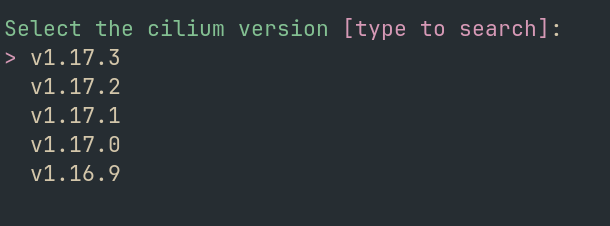
Cilium configuration
You can customize the Cilium Configuration. 3 modes are available:
- Default: It represents opinionated configuration for Cilium by Ksctl Team.
 1hubble:
 2  ui:
 3    enabled: true
 4  relay:
 5    enabled: true
 6  metrics:
 7    enabled:
 8      - dns
 9      - drop
10      - tcp
11      - flow
12      - port-distribution
13      - icmp
14      - httpV2:exemplars=true;labelsContext=source_ip,source_namespace,source_workload,destination_ip,destination_namespace,destination_workload,traffic_direction
15
16l7Proxy: true
17kubeProxyReplacement: true
18
19encryption:
20  enabled: true
21  type: wireguard
22
23operator:
24  replicas: 3
25  prometheus:
26    enabled: true
27
28prometheus:
29  enabled: true
- Advance: You can specify the helm chart
values.ymlfile to customize the Cilium configuration. it will open a text editor based on your terminal ENV$EDITORif not set it will usevimas default. Refer Helm Chart Values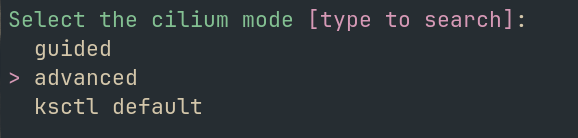
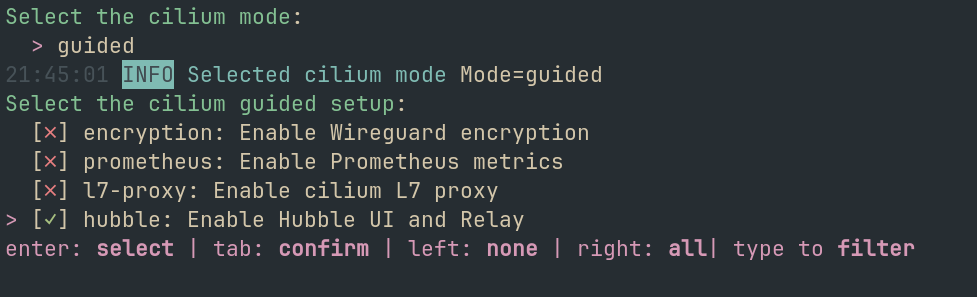
- Guided: It will provide you our preconfigured options of what all specific omponents to Enable/Disable
Feedback
Was this page helpful?
Glad to hear it! Please tell us how we can improve.
Sorry to hear that. Please tell us how we can improve.